
v259
Chat launcher script Link
<script src="https://cdn.sentione.com/chat-ui-launcher/chat.1.77.2.js"></script>Enhanced Performance & Stability
This update introduces "under-the-hood" optimizations to ensure the Webchat widget remains lightweight and does not impact your website's loading speed.
- Smart Connection Handling: The Webchat no longer opens unnecessary server connections for every visitor.
- Resource Efficiency: Connections are now established only when a user has an active session or manually opens the chat window.
- Faster Page Loads: By reducing background activity for new visitors, the widget has a smaller footprint on your site’s overall performance.
- Mobile-Friendly Optimization: The system now detects inactive browser tabs and closes idle connections to save user data and battery.
New Localization & API Features
-
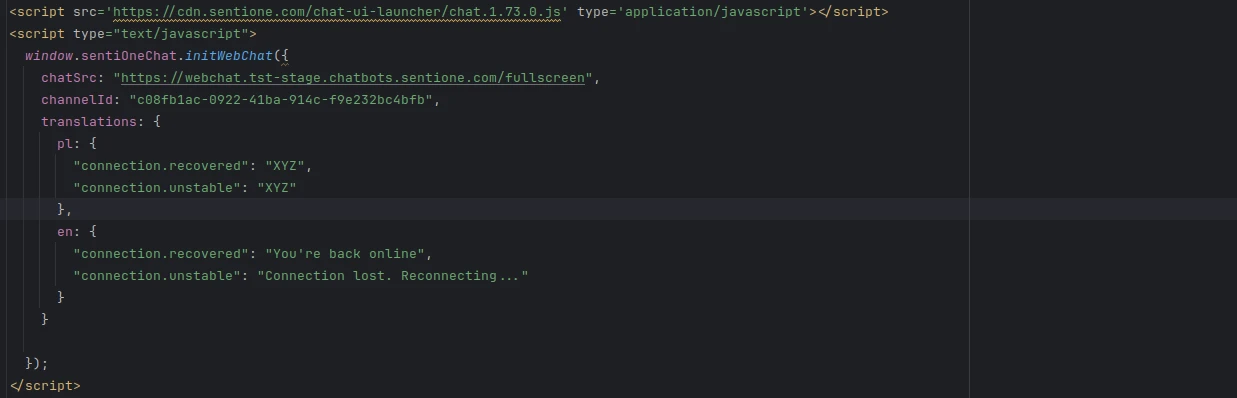
New Configuration Field: A new translation field has been added to the widget configuration schema, allowing for more granular control over localized content.
-
New API Method: Added window.sentiOneChat.getTranslations()—a global method that allows developers to programmatically retrieve the currently active translation object.
-
Dynamic Localization: The new field and method work together to provide better support for multi-language environments and custom front-end integrations.
sentiOneChat.sendEvent Method
sentiOneChat.sendEvent MethodUse the sentiOneChat.sendEvent() method when you want to trigger the bot from the host page and optionally show a short system-style label to the user.
API
Method: sentiOneChat.sendEvent()
window.sentiOneChat.sendEvent(payload?: {
  label?: string;
  extraData?: object;
}): void
UI Behavior
- If you pass
label, the user sees a small system badge in chat. - If you do not pass
label, nothing is shown in chat.
Examples
Metadata only (no visible UI element)
window.sentiOneChat.sendEvent({
  extraData: {
    eventType: 'order_process_change',
    process: 'premium_support',
  },
});
Badge + metadata
window.sentiOneChat.sendEvent({
  label: 'Process changed to X',
  extraData: {
    eventType: 'order_process_change',
    process: 'premium_support',
  },
});
Real-life example (order support flow)
window.sentiOneChat.sendEvent({
  label: 'Order flow updated',
  extraData: {
    eventType: 'order_process_change',
    process: 'premium_support',
    orderId: 'ORD-2026-000421',
    source: 'checkout',
    customerTier: 'gold',
  },
});
Summary
sentiOneChat.sendEvent()method triggers the bot from your page.labelcontrols whether users see a badge.extraDatais sent to the bot with the event.extraDatacan be handled in the bot Flow module.- Based on
extraData, the bot can be programmed to run different operations or follow different conversation paths. extraDatafrominitialMessageandeveryMessageis merged withextraDatafrom the event
payload.- Because the system can process only one message at a time, it does not support parallel event submissions; therefore, the host
page is responsible for guarding against repeated or concurrentsendEvent()calls.
Updated 7 months ago