
Integration Guide
This document outlines how to handle conversation transfers (redirects), and the logic behind conversation termination.
1. Prerequisites
Before configuring the flow, ensure that your environment is set up correctly.
- Configuration: You must have a Genesys instance and a Webchat channel configured. Please refer to the Configuration for detailed setup instructions.
2. How to Perform a Redirect
To transfer a user from the bot to a live agent on a specific queue within Genesys, follow these steps:
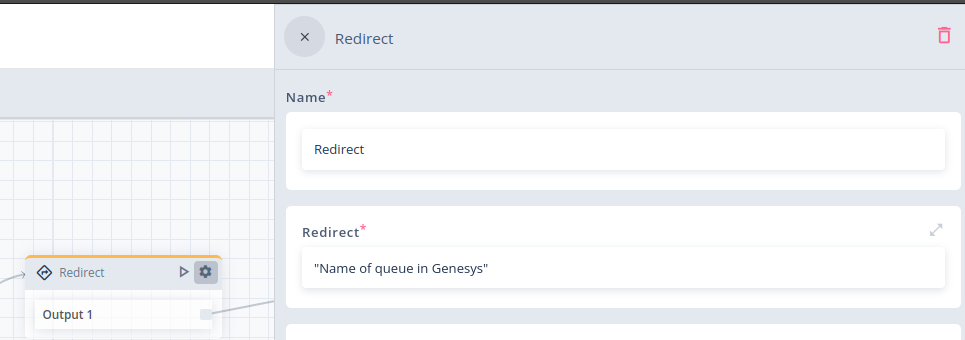
- Add Redirect Block: Insert a Redirect block at the point in your flow where the handover should occur.
- Configure Target: In the Redirect field of the block settings, input the exact name of the Genesys Queue where the conversation should be routed.
Note: Ensure the queue name matches exactly what is defined in your Genesys panel to avoid routing errors.
Agent-to-Agent Transfers
Once the conversation has been successfully redirected to Genesys, the live agents have full control. It is possible for agents to transfer the conversation to other agents or queues within Genesys using standard Genesys functionality.
Resuming Bot Session
It is possible to return the user to the bot after the live agent interaction is finished.
- Configuration: Enable the "Resume bot session after ending agent conversation" option within the Redirect block settings.
- Behavior: When the Genesys agent manually closes the conversation, the system will not end the chat session. Instead, the bot will regain control and continue the flow immediately after the Redirect block.
3. Conversation Closure Logic
A conversation session can be terminated in three ways, depending on user activity and system ownership.
Manual Closure
- Agent Action: The conversation is closed manually by the live agent within the Genesys console.
Automatic Closure
- End of Flow: The system automatically closes the conversation if the bot reaches the logical end of the configured flow.
- Timeout (Inactivity): The system automatically closes the conversation after defined session max inactivity.
Important: The session max inactivity timeout applies only if the bot is currently the owner of the conversation. If the conversation has been handed over to an agent, Genesys timeout rules apply.
4. Passing Data to Genesys
To pass additional session information (such as user details) to the external system, you can use the SetExternalSessionAttributes command.
For full implementation details, please refer to the SetExternalSessionAttributes Documentation.
5. Accessing properties of Genesys conversation
Please refer to the Genesys extra data Documentation.
5. FAQ & Troubleshooting
Q: I am getting an error during handover. What should I do?
A: This error typically occurs when the system cannot locate the target queue due to permission restrictions.
Please verify that the Target Queue belongs to the same Division as your Genesys Credentials. If the credentials (OAuth client) and the Queue are in different divisions, the integration will not have permission to route the conversation.
Updated 7 months ago