
Sound & page title notifications
📘 Availability: This feature is available starting from webchat version v264.
Webchat can notify the visitor about new messages when they are not looking at the page: by playing a notification sound and by changing the page title (e.g. New messages (2) | Your page).
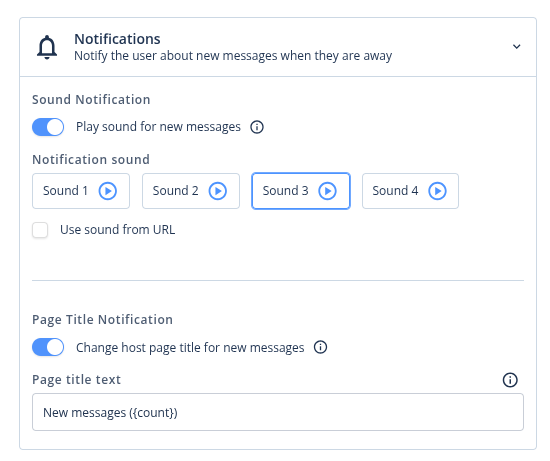
Both features are disabled by default and are configured per channel in the admin panel: Channels → your webchat channel → Notifications.
Sound notification
When enabled, a sound is played for incoming messages:
| Situation | Message from bot | Message from agent |
|---|---|---|
| Visitor is viewing the chat | no sound | sound |
| Visitor is on the host page, outside the chat | no sound | sound |
| Visitor is on another tab, window or application | sound | sound |
You can choose one of the built-in sounds (with a preview in the admin panel) or provide your own file URL (mp3/wav, served over https). When no URL is set, the default sound is used.
Browser autoplay policyBrowsers block audio on pages the visitor has not interacted with. The sound becomes available after the first interaction with the chat (e.g. typing a message). This is a browser-level restriction and cannot be bypassed.
Page title notification
When enabled and a message arrives while the visitor is away, the page title changes. You can provide your own text — use the {count} placeholder to include the number of unread messages:
- text New messages ({count}) → New messages (2) | Original title
- empty text → (2) Original title
The original title is restored as soon as the visitor comes back to the page or sends a message.
Configuration (via Channel configuration form)
Embedding without the launcher
When the webchat is embedded with a plain iframe (without webchat-launcher.js), there is no channel form — the configuration is passed in the SET_CONFIG message instead:
{
  "notifications": {
    "sound": {
      "enabled": true,
      "url": "https://your-cdn.com/notification.mp3"
    },
    "pageTitle": {
      "enabled": true,
      "text": "New messages ({count})"
    }
  }
}The pageTitle settings are consumed by the launcher. Without the launcher they have no effect — see the note at the end of this section for implementing title updates on the host page yourself.
Sound notifications work in this mode, with two caveats:
- add allow="autoplay" to your iframe element, otherwise the sound requires a prior interaction inside the chat,
- away detection is limited to a hidden tab. To also cover "another window / application", forward your page's focus state to the iframe (this is what the launcher normally does):
<script>
  const iframe = document.getElementById('webchat-frame');
  const sendFocusState = () => {
    iframe.contentWindow.postMessage(
      {
        type: 'HOST_FOCUS_CHANGED',
        payload: { focused: document.hasFocus() },
      },
      'https://<your-webchat-host>'
    );
  };
  window.addEventListener('focus', sendFocusState);
  window.addEventListener('blur', sendFocusState);
</script>
Page title notifications are not available in this mode — a cross-origin iframe cannot change the title of your page. Either use the launcher, or listen to the MESSAGE_RECEIVED events the webchat posts to your page and update document.title yourself:
let originalTitle = null;
let unreadCount = 0;

const resetTitle = () => {
  unreadCount = 0;
  if (originalTitle !== null) {
    document.title = originalTitle;
    originalTitle = null;
  }
};

window.addEventListener('message', (event) => {
  if (event.origin !== 'https://<your-webchat-host>') return;

  if (event.data?.type === 'MESSAGE_RECEIVED' && event.data.payload?.type !== 'error') {
    if (document.hasFocus()) return;

    unreadCount += 1;
    if (originalTitle === null) {
      originalTitle = document.title;
    }
    document.title = `New messages (${unreadCount}) | ${originalTitle}`;
  }
});

window.addEventListener('focus', resetTitle);
document.addEventListener('visibilitychange', () => {
  if (!document.hidden) resetTitle();
});
Updated 3 months ago